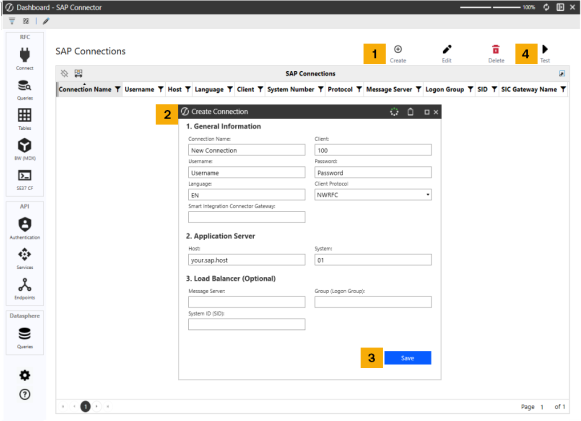
To set up a new RFC connection to your SAP environment, follow these steps:
-
Click the Create icon.
-
Populate the Create Connection dialog box with the following information:
-
General Information
- Connection Name: Name chosen by Administrator
-
Username: SAP username
-
Language: Preferred language
-
Smart Integration Connector Gateway: Set up cloud servicer
-
Client: Number corresponding to the SAP client number
-
Password: SAP Password
-
Client Protocol: RFC or NWRFC used to connect to SAP instance
-
Application Server
-
Host: Your SAP host
-
System: Client System number
-
- Load Balancer (Optional)
-
Message Server (optional): Message servicer
-
Group (optional): Group Logon
-
System ID (SID) (optional): System ID
-
-
-
Click the Save button.
-
Click the Test button to verify if the connection was successful.
Edit or delete your connections at any time by selecting your connection and using the respective icons.


